Using the Library
At the Greenwood Public Library, we receive a wide variety of questions. For your convenience, we have assembled a list of the most commonly asked questions.
If you have any questions, you may call the Greenwood Public Library during our open hours at (302) 855-1242.
Table of Contents
- Library Cards
- Checking Out and Returning
- Using the Delaware Library Catalog
- Holds
- Inter-Library Loans/Out-of-State items
- Library Programs
- More Services
Library Cards
If you don’t have a Library Card, getting one is easy and FREE!*
- Come to the Greenwood Public Library.
- Ask for a Library Card Application Form.
- Fill it out, and provide current proof of Delaware Residency (i.e, ID/Driver’s License, 2 pieces of mail and ID) OR proof of Property Ownership.
- For anyone under the age of 18, a Parent or Guardian must be present to sign.
Congratulations! You now have a Library Card, and can use all services provided by Delaware Libraries!
*Out-of-State cardholders must pay a fee of $25.00 per year.
- Come to the Greenwood Public Library.
- Provide valid ID. (i.e, ID/Driver’s License)
- Pay the $2.00 replacement fee. We accept cash or check.
- You will get a brand-new Library Card!
After your Library Card has been replaced, your Library Card Number will change. Library services such as Hoopla, Libby, etc. that you have accessed with your Library Card will need to be updated.
Any child may get a Library Card from birth. A parent or guardian must be present to sign on behalf of the child.
Out-of-State cardholders must pay a yearly fee of $25.00 in order to keep an active Library Card.
You may not check out items under another person’s account if you do not have that person’s library card, and the person is not present.
You may go to any staff member available at the front desk to authorize another user to pick up holds for you. Present your Library Card, and provide the name(s) of who you would like to authorize.
- Go to the Greenwood Public Library.
- Mention that you have an Online Card, and would like your account updated to be allowed to check out physical materials.
- OR, you may instead ask for a physical Library Card. Your first Library Card is completely free.
- Provide your current Library Card Number, or valid ID.
Congratulations! You may now check out physical materials. If you opt to get a physical Library Card, Library services such as Hoopla, Libby, etc. that you have accessed with your Library Card will need to be updated.
Checking Out and Returning
You may also use our Self Checkout machine, located across from the main front desk. Scan your Library Card, type in your PIN, and scan each item.
At the Greenwood Public Library, we have the following materials available for checkout:
- Books
- Audio Books
- CDs
- DVDs
- Puzzles
- Board Games
- Magazines
- Wonderbooks
- Tonieboxes
- Tonie Figures
- LEGO Kits
And more!
The following items may only be checked out by Adult Cardholders (18+):
- Chromebooks
- Wi-Fi Hotspots
- Telescope
For materials with multiple pieces, (i.e DVDs, puzzles…) please ensure that all pieces are placed back into the appropriate cases before returning. Incomplete materials will not be checked in until all pieces are returned.
You do not need to present your checkout receipt, or your Library Card to return materials.
Puzzles and Technology, such as Wi-Fi hotspots and Chromebooks, cannot go into the book drop, and must be returned inside of the building.
Book Drop Directions
The book drop is located slightly further down Mill Street, past the Library. It is a large box with two chutes, labeled “LIBRARY RETURN”
- At the STOP sign in the Library parking lot, turn RIGHT.
- Follow the sidewalk until you see a large box, labeled “LIBRARY RETURN”.
- Congratulations! You have found the book drop.
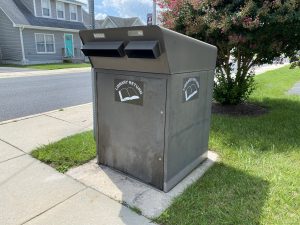
This is what the Greenwood Public Library’s book drop looks like.
Items that are returned in the book drop will be considered ‘returned’ on the last day that the Library was open.
Example: You return an item in the book drop on Sunday. When the Library opens on Monday, your item will be checked in as though you returned it on Saturday.
How it works:
3 days before the item’s due date, it may automatically renew itself for another 3 weeks. It may renew up to 3 times. If an item is on hold for another user, or if the item has already been renewed 3 times, it will not automatically renew. You will receive an email notification for which items have been renewed, and which have not. If you do not have an email linked to your account, you will not be notified.
Lost/Damaged Item Fines: The cost of the item, OR an exact replacement.
The overdue fine applies to all items. If the fine on your account is over $20.00, your account will be blocked from checking out items and using the Library computers until you have paid your fines.
We accept cash or check. We do not accept cards.
The Greenwood Public Library accepts replacement copies for lost and/or damaged items.
If you would like to purchase a replacement copy of the item you have lost, please ensure it is an exact copy. Ensure the ISBN (International Standard Book Number) matches the item, has the same cover, and is the same edition. We do not accept old Library items as replacement items.
We do accept hardcover replacements for paperback books, but we do not accept paperback replacements for hardcover books. Please ensure that the replacement item is in very good or brand new condition.
This is a Greenwood-specific policy, and other Sussex County Libraries may handle replacement copies differently. If the item is owned by another Library, please ask that specific Library how to proceed.
When an item is damaged, don’t panic!
DO write down, or verbally tell a staff member, when an item is damaged!
In order to repair an item, we must first know that it needs repairing.
DO NOT attempt to repair the item yourself!
While we appreciate the thought, our Library staff is trained with the proper tools required to repair most item issues.
If an item is returned with irreparable damage, (i.e, water damage, playful puppy) we may issue a fine to your account, equal to the price of the item when it was originally purchased. Please bring the item to the Library so our staff can determine what the next steps should be.
We understand that returning a damaged item may be difficult. We will never be upset or judgemental over a damaged item being brought to our attention! Library materials are expected to receive some amount of wear and tear throughout their lifetime. It is simply a sign that the item has been well-loved.
Thank you for your concern regarding item damage.
Using the Delaware Library Catalog
To log into your Library Account on a Computer:
- Open your browser and type in: dlc.lib.de.us
- Click “Log In”.
- Type in your Library Card Number and PIN number.
- Your Library Card Number can be found on the back of your Library Card. It is 14 digits long.
To log into your Library Account on a Mobile Device:
- Download the FREE Delaware Library Catalog app.
- Tap “My Account”
- Tap “Sign In”
- You may either scan your Library Card Barcode, or type in the numbers manually.
- Type in your PIN.
A benefit of having the DLC app on your mobile device is that you gain access to a digital copy of your Library Card!
You may also ask the Greenwood Public Library staff for assistance with using the catalog, whether in-person or by phone.
Through the Delaware Library Catalog:
- Click “Log In”.
- Click “Change/Forgot my PIN”.
- Enter your 14-digit Library Card number.
- A message will be sent to the email on file with a link to change your PIN number.
In-Person or By Phone:
- Go to the Greenwood Public Library, or call.
- Provide your Library Card number.
- If calling by phone, you will be asked to verify your identity.
- You may ask to change your PIN, or learn what your current PIN is.
Holds
If the Greenwood Public Library doesn’t have the item that you want, you can still get that item without having to go to another Library.
All public Delaware Libraries are connected. If you place an item on hold, it will be sent from the owning Library to the Library of your choice. This service is provided to all Library users completely for FREE!
Through the Delaware Library Catalog:
- Search for the item you want to put on hold.
- Click on the purple “Place Hold” button.
- Select the Library you want to pick the item up from.
- Click on the “Place Hold(s)” button to confirm your request.
In the app:
- Search for the item you want to put on hold.
- Tap on the “Place Hold” button.
- Select the Library you want to pick the item up from.
- Your “home” Library will be automatically selected, but you may choose to pick up the item from any Delaware Library.
- Tap on the “Place Hold” button to confirm your request.
In-Person or By Phone:
- Provide your Library Card number.
- If calling by phone, you will be asked to verify your identity.
- Provide the Title and Author of the item.
- The staff member will confirm if the item has been successfully put on hold.
You can check if your account is set up to receive text notifications by visiting the Delaware Library Catalog “My Account” Page, by asking any staff member available at the front desk, or by calling the Library at (302) 855-1242.
How long does it take?
Generally, a hold may take anywhere from 2 days to several weeks to arrive.
Holds are not an immediate books-on-demand service; they are meant as a way to guarantee that you will get to have a turn with the item, while not having to travel to another Library. Items that are bestsellers/in high demand may take longer to arrive.
You may go to any staff member available at the front desk to authorize another user to pick up holds for you. Present your Library Card, and provide the name(s) of who you would like to authorize.
How long will I have to pick it up?
You will have a week (7 days) starting from the day that the hold arrives to come to the Library and pick it up. After a week has lapsed, the item will be sent back to the owning Library.
There are no penalties for not picking up holds, and you may place the items back on hold if you would still like to receive them.
You cannot place a hold on an item IF:
- The item has the location listed as “WALK-IN ONLY”.
- The item has the location listed as “BROWSE”.
- The item is owned by a Library not participating in transit.
Inter-Library Loans (ILL)
An ILL is used to gain access to materials that are not available in our Library System.
Renewing an ILL works differently than renewing other Library materials. You must ask Library staff if you are able to renew the item. There is no guarantee that the item will be renewable.
When returning an ILL, please ensure it is returned directly to the Greenwood Public Library, and no other Library.
If you consistently do not pick up requested ILLs when they are available, you may be prohibited from requesting ILLs from Greenwood Public Library in the future.
While we offer inter-Library loans as a FREE service, it does cost money to pay for the shipping of materials. We ask that all Library users be conscientious and respectful of this fact by picking up requested ILLs on time, so that we may continue to offer this service in the future!
Online:
In-Person or By Phone:
- Provide your Library Card number.
- Mention you would like to request an Inter-Library Loan.
- Provide the title, author, and other information about the item, if necessary.
- Provide a phone number or email.
The Library receives all ILLs through the United States Postal Service.
Library Programs
A “Program” is a free event hosted or presented by the Library. Library Programs are always free to attend.
You can view our current calendar of Programs here.
You can view our Program Cancellation Policy here.
If you have a Program or activity you’d like for us to consider scheduling in the future, let us know!
Anyone can attend Programs, regardless of residency or Library card-holding status. We ask that age requirements for Programs be respected.
If there is space, well-behaved children and teens may sit in on adult Programs, as long as a parent/guardian is present and supervising. Young adults may attend teen Programs provided they act respectfully.
Adults who are not engaged in a children/teen Program, nor are caregivers for a child/teen, may be asked to relocate to other areas of the Library. Children 12 and under must be accompanied by a parent/guardian.
These rules are in place to ensure a quality experience for all Program attendees.
- Register for Programs that say “registration required.”
- If you are no longer able to attend a program that you have registered for, please notify the Library as soon as possible, so that we may release your seat to another person on the waiting list.
- Events without registration are first come, first served.
- All Library policies apply during Programs.
- Keep language and behavior respectful.
- Foul language will not be tolerated.
- Silence phone ringers.
- Staff may ask anyone to step out of the Program at their discretion.
Some Programs require registration, because supplies or seats may be limited, and we want to provide the best Program experience for all attendees. Not all Programs require registration.
Registering for a Program Online:
- Navigate to the Greenwood Public Library Calendar, and click on the Program that you want to register for.
- Scroll to the bottom of the page, and select how many people are attending.
You will NOT be able to change this number after confirming your registration, please ensure it is correct.
For Children’s Programs: Only register those that will be participating in the program. If you are registering 1 child, select 1. If you are registering 2 children, select 2, etc.
- Click on the ‘Begin Registration’ button, and fill out all fields.
- After filling out all fields, click on the ‘Register’ button to confirm your registration.
You will NOT be able to edit details of your registration after clicking this button, please ensure it is accurate.
If you choose to add an email to your registration, you will receive an email confirmation that you have successfully registered.
If you are having difficulty registering for a Program, or need to change any details of your registration, you may go to any staff member available at the front desk for assistance.
More Services
- Sussex County Department of Libraries
- Sussex County Government
- Policies and Forms
- Ask a Librarian
- Wireless Printing
- Dial-A-Story is available 24 hours a day, 7 days a week. Two stories are offered.
- English: (302) 856-3535 and (302) 856-3536
- Spanish: (302) 856-3537
- Parking lot Wi-Fi access is available 6:00 AM – 9:00 PM, daily
- Network: Library-Outdoors
Last modified on August 7th, 2026.